
ASO School
You can learn about ASO, App marketing, app store optimization and app promotional strategies here and gain the latest app market news and analysis. Helping you to carry out app store optimization and promote app data growth.
Ten Proven Tips to Boost Your App Store Rating
2026-01-27
Meta description:This article compiles 10 actionable tips for boosting your App Store Ratings, covering everything from optimizing the product experience to managing Reviews. It provides a comprehensive guide to App Store Ratings optimization, showing you how to effectively improve your app’s star rating and achieve dual growth in Ratings and download numbers.
Introduction
App Store Ratings are a direct reflection of users’ app experience, and they are a core factor influencing app download conversion and algorithmic recommendation weighting. Low-star Ratings can directly discourage potential users from downloading your app, making them a key operational pain point for many developers and operators. Improving App Store Ratings is not as simple as just prompting users for positive Reviews; it requires comprehensive optimization that integrates the product itself, Apple’s official guidelines, and user operations. All actions must be conducted in compliance with Apple’s rules to avoid crossing the red lines of Apple’s review process. The 10 practical tips compiled in this article are all based on Apple’s official guidelines and frontline operational experience—no empty theories, just actionable strategies you can implement right away to help you optimize your App Store Ratings in a scientific and effective way.
10 Proven Tips to Boost Your App Store Ratings
-
Polish the core product experience to reduce negative Ratings at the source.
The core and fundamental factor in optimizing App Store Ratings is always the product itself. This is the most basic yet crucial aspect of mastering App Store Ratings techniques. Negative Reviews almost always stem from flaws in the product experience, so optimization must begin at the foundational level.
-
Establish a full-dimensional testing system, and conduct compatibility tests for different device models and system versions before launch, with a focus on identifying and resolving high-frequency issues such as crashes, lag, and payment failures.
-
Collect user operation data through in-app tracking points to pinpoint pain points in the use of core features, such as cumbersome processes and unsmooth interactions.
-
Strictly control ad placement, avoid inserting pop-up ads into core operational workflows, reduce unnecessary ad pushes, and ensure the continuity of the user experience.
-
Precisely time your request for Reviews to avoid wasting the official limit of 3 Ratings.
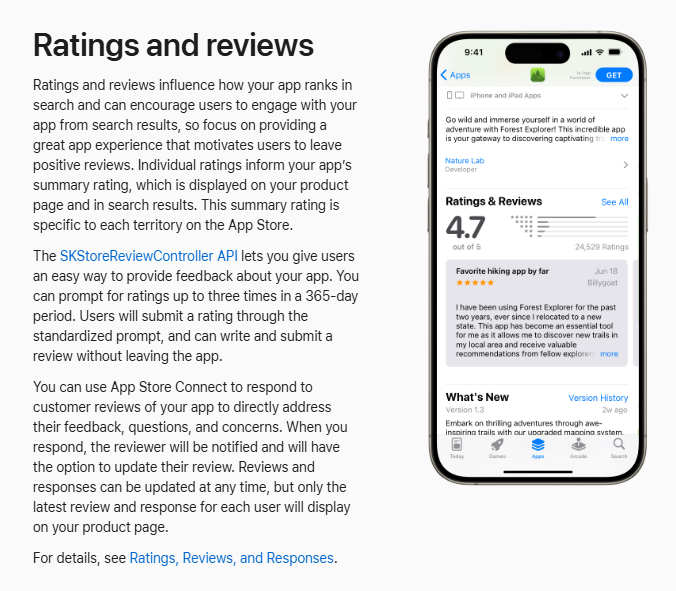
Apple has imposed strict frequency limits on Review Requests through the SKStoreReviewController API: each user can receive no more than 3 system-based Reviews pop-ups within 365 days. By strategically timing these requests, you can significantly boost your Ratings.
-
The request for Reviews should be triggered only after the user has had a positive experience—for example, after a game user clears a level, a utility app user completes a core operation, or a lifestyle app user achieves their usage goal.
-
Set a 2-3 second delay when triggering the pop-up to avoid interrupting users immediately after they’ve completed an action, thereby reducing their frustration.
-
Absolutely avoid triggering Reviews requests during the app’s first launch, when users encounter operational obstacles, or when the app fails to load. At these times, users have no positive experience and are more likely to provide negative feedback.
-
Compliance guidance encourages Reviews to stay clear of Apple’s review red lines.
Apple has clear prohibitions against guiding behavior for App Store Ratings, and violations can result in app warnings or even removal from the store. Compliance is the prerequisite for guiding users to leave Reviews.
-
Only use the rating pop-up window built into the Apple system; do not customize the pop-up style or content, and do not implement filtering-based display.
-
Do not use in-app material rewards to induce positive Ratings, such as awarding points, coupons, or unlocking paid features, as this is explicitly prohibited by Apple.
-
A lightweight “Reviews Us” entry can be placed in non-core areas such as the personal center, providing only a prompt for voluntary Reviews without any mandatory guidance.
-
Respond to negative Reviews within 24 hours and proactively turn negative emotions into positive ones.
The efficiency of handling negative Reviews directly affects potential users’ download decisions and lies at the core of App Store user Reviews management. Timely and sincere responses can effectively transform users’ negative emotions.
-
Establish a Ratings and Reviews monitoring mechanism to ensure that all negative Ratings receive a response within 24 hours, and avoid using generic, perfunctory templates such as “We’ll handle this as soon as possible.”
-
Responses should follow the logic of “apology + identifying the cause + providing a solution,” offering concrete, actionable solutions tailored to the user’s specific issue, rather than making vague or general statements.

-
After replying, users will receive a system notification, and some users will update their Reviews once their issue is resolved, thereby achieving a positive conversion of negative Ratings.
-
Use the Ratings reset feature with caution, balancing new Ratings and quantity.
Apple allows developers to reset Ratings when a new version is released, so that the Ratings better reflect the experience with the current version. However, this feature is not suitable for all scenarios, and a thorough evaluation is required before use.
-
Only consider using the reset feature once the app has completed a core experience overhaul and thoroughly addressed the fundamental issues that led to a large volume of negative Reviews.
-
Avoid resetting Ratings after minor fixes; doing so will reset the total number of Ratings to zero. Too few Ratings can breed distrust among potential users and reduce download conversions.
-
If you decide to reset the Ratings, you need to prepare in advance for guiding positive Reviews, ensuring that once the new version goes live, a certain number of positive Reviews can be quickly accumulated to support stellar Ratings performance.
-
Optimize the App Store product page to enhance first-time user experience and positive impressions.
A user’s first impression before downloading an app comes entirely from the App Store product page. By optimizing your App Store metadata, you can enhance users’ initial good impression and attract a more aligned target audience.
-
Optimize visual assets: Use simple and eye-catching icons that align with the app’s positioning, and prioritize screenshots that showcase core features and usage scenarios rather than merely displaying the interface.
-
Polish the app description to clearly articulate the core value, and highlight the high-frequency issues that have been fixed, so users can perceive the developer’s commitment to continuous improvement.
-
Use Apple’s official product page optimization tool to test the conversion performance of different creative assets and continuously iterate and optimize.
Many developers have done a great job optimizing their product experience and Ratings, but because the metadata layout on their product pages is not done properly, high-quality Ratings fail to translate into actual download numbers. If you’re facing a similar challenge, we can leverage your app category and target user needs to create a high-conversion product page optimization strategy, and in combination with keyword placement, further drive Improved keyword rankings, allowing the effect of improved Ratings to continue to amplify. Contact us now.APPFAST Business, you can obtain a dedicated metadata optimization solution.
-
Establish an in-app user feedback system to proactively mitigate experience-related issues.
Many users leave negative Ratings because they can’t get timely feedback on their issues, so they vent their frustrations on the App Store instead. By building feedback channels directly within the app, most issues can be resolved before users even leave Reviews.
-
Set up a “Feedback” entry in an easily accessible location, such as the personal center, to allow users to upload screenshots and describe specific usage scenarios, thereby lowering the threshold for providing Feedback;
-
Establish a feedback response mechanism to ensure that customer service staff communicate with users who provide feedback within 24 hours and promptly follow up on the progress of issue resolution.
-
Regularly organize high-frequency feedback issues, incorporate them into the product optimization schedule, and publish update announcements within the app so that users can feel their input is valued.
-
The version update includes targeted bug fixes and prompts users to leave new Ratings.
App version updates are a crucial opportunity to improve Ratings; each update should focus on addressing high-frequency issues mentioned in user Reviews, rather than merely iterating on features.
-
Clearly specify the specific issues that have been fixed in the release notes, such as “Fixed the crash issue in the XX scenario” or “Optimized the operation flow of the XX feature,” to convey your commitment to continuous improvement.
-
For users who have already provided related Reviews, send lightweight in-app push notifications to inform them that the issue has been fixed and to encourage them to re-experience the app.
-
After the new version goes live, you can trigger a request for Reviews at an appropriate time, encouraging users whose experience has improved to leave positive Ratings.
-
Monitor malicious Reviews, report them promptly to safeguard the Ratings ecosystem.
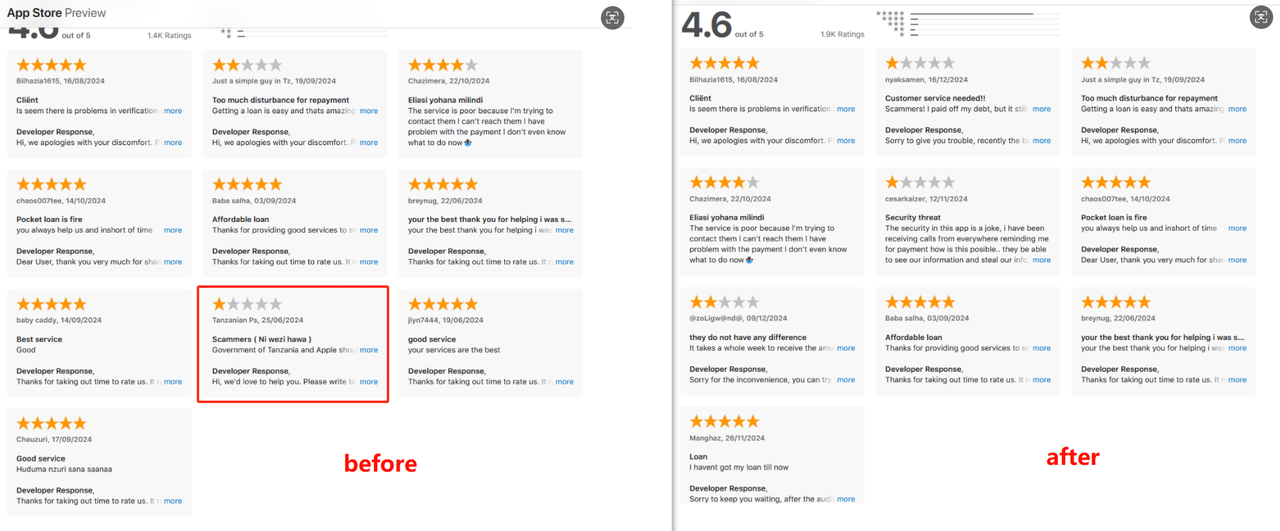
In the App Store Ratings system, malicious Reviews occasionally appear, such as smear campaigns by competitors, meaningless one-star Reviews, and personal attacks. These types of Reviews unnecessarily drag down the Ratings and need to be addressed promptly:
-
Monitor app Reviews to identify characteristics of malicious Reviews: no specific problem description, purely emotional complaints, multiple Reviews from the same account within a short period of time, and the use of aggressive language.
-
For malicious Reviews, promptly report them through the “Report a concern” feature in App Store Connect, clearly stating the reason for the report and providing relevant evidence.
-
Leverage AppFast's expertise Negative Reviews Handling Service, Efficiently handle malicious and Violation negative Reviews on the App Store product Reviews page, enabling precise deletion and reducing the drag on the app’s overall Ratings from invalid negative Reviews at the source.
-
Establish a Ratings monitoring system and dynamically adjust optimization strategies.
Improving App Store Ratings is not a one-time operation, but a dynamic optimization process. A robust monitoring system enables optimization strategies to be more targeted:
-
Monitor core metrics: overall star Ratings, daily new Reviews, positive Review rate, and classification of negative Review issues, and generate daily and weekly data Reports.
-
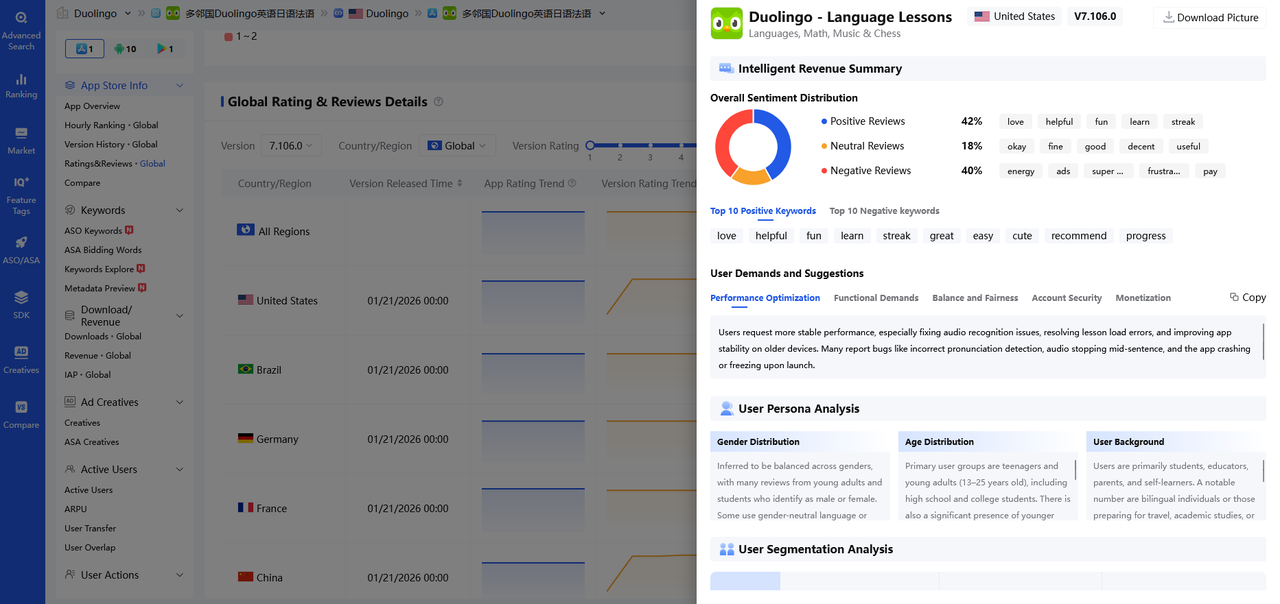
Use ASO tools to conduct in-depth multi-dimensional analysis of app versions from perspectives such as user distribution, issue demands, and action recommendations, thereby generating a comprehensive report that precisely identifies the direction for product optimization.
-
When Ratings start to decline continuously, immediately activate the emergency plan to investigate product issues and Reviews, swiftly implement corrective measures, and prevent further deterioration of the Ratings.
Summary
The core of mastering App Store Ratings lies in deeply integrating product optimization, compliant operations, and user management. The level of Ratings fundamentally reflects users’ genuine feedback on their app experience. To effectively improve App Store Ratings, you must genuinely think from the user’s perspective: address their pain points, resolve their usage challenges, and, through scientific operational strategies, guide more high-quality users to leave positive Reviews.
If your app is facing issues such as low Ratings, significant Ratings fluctuations, or a disconnect between Ratings and download numbers, it can be difficult to maximize results with a single optimization approach. Our one-stop optimization service integrates Improved keyword rankings, three core capabilities—metadata optimization and boosted download volumes—drive a positive cycle of Ratings, exposure, and downloads by focusing on three dimensions: product exposure, user conversion, and Ratings optimization, ensuring that improvements in App Store Ratings truly translate into a core growth driver for your app.Consult our expert advisors now., Unlock a customized optimization plan tailored specifically for App Store Ratings.

Free consultation with ASO specialists
Doing ASO for the first time or have no idea how to carry out targeted optimization of your app?
We offer one-on-one customized services provided by app marketing specialists
Related recommendations



Copyright © 2018 - 2021 AppFast Company, LLC. All Rights Reserved. The AppFast word mark is a
registered trademark of AppFast Company, LLC in the US and other countries.